Non-webhook fields and models Framework v1.6.0+
Some fields on Shopify models are non-webhook: they are not included in Shopify webhook payloads. This means they need to be manually fetched using Shopify's GraphQL API.
Your Shopify models and fields can be configured to automatically fetch these fields on incoming webhooks.
These non-webhook fields are also populated during a Shopify data sync or nightly reconciliation.
Webhook-only field configuration is only available if your Shopify connection uses Shopify API version 2025-04 or greater.
Fetch on webhook vs fetch later
Each non-webhook field on a model that receives webhooks can be configured as follows:
- Fetch on webhook: When a webhook is received for that model, Gadget fetches the full data for that field from the Shopify API and updates the record. The field is populated as soon as the webhook is processed.
- Fetch later: This is the default for new apps. The field is not fetched when the webhook is processed. It remains
nullor unchanged until the next sync or reconciliation.
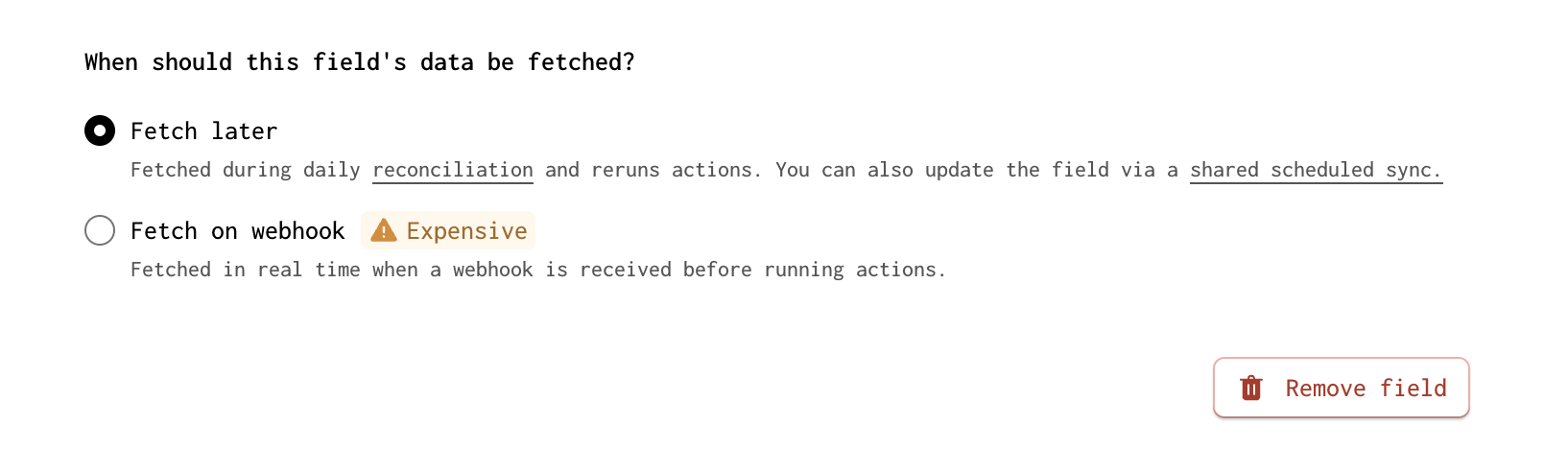
You can change this per field: open the field configuration for a non-webhook field on a webhook-enabled model and choose whether to fetch on webhook or fetch later.
Rate limits and request time
When you set a non-webhook field to fetch on webhook, Gadget makes one or more requests to the Shopify API for each webhook that affects that model. For example, has many fields require paginating through queries to fetch all related child data, so a single webhook can trigger multiple API calls. Consider the following:
- Shopify API rate limits: Each request counts against your app's Shopify API rate limit. High-volume webhooks, such as orders or products, with many non-webhook fields set to fetch on webhook can potentially consume a lot of your available rate limit. This is especially true when has many fields require multiple paginated requests per webhook.
- Gadget request time: Fetching on webhook uses request time on Gadget while the API calls run. If you enable fetch on webhook for many fields or on high-traffic models, webhook processing can take longer and use more of your plan's request time.
Use fetch later for non-webhook fields when you do not need the data immediately. The nightly reconciliation will populate them without adding per-webhook API calls.
Adding non-webhook fields
For new apps, only fields included in Shopify webhook payloads are added to models by default. Non-webhook fields are not added automatically.
To add non-webhook fields to a model:
- Open the model in the Gadget editor.
- Use the Add fields dropdown to add the non-webhook fields you need.
- For each non-webhook field, configure whether to fetch on webhook or fetch later.
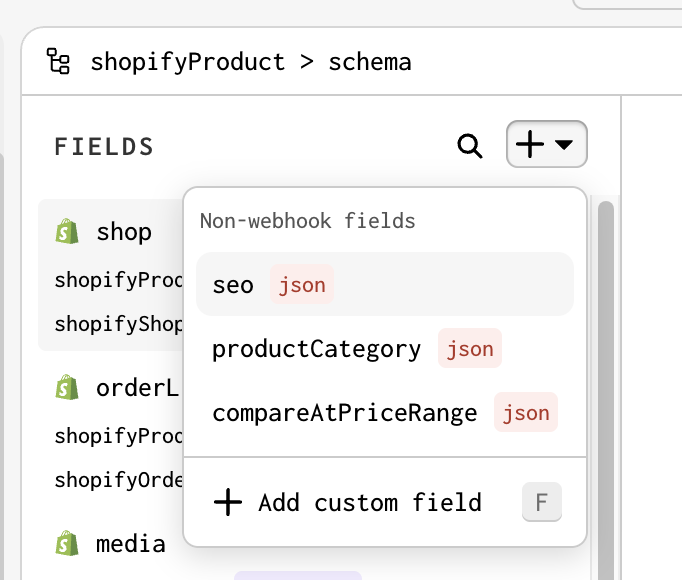
Available non-webhook fields
| Model Name | Fields |
|---|---|
| Shopify Company | Contact CountContacts CountOrders CountLocations CountDefault RoleLifetime DurationMain ContactTotal SpentContact RolesContact Role Assignments |
| Shopify Company Address | Company NameFormatted AddressFormatted Area |
| Shopify Company Contact | CustomerIs Main ContactLifetime Duration |
| Shopify Company Location | Orders CountCurrencyTimeline CommentMarketTax Registration IDTotal SpentRole Assignments |
| Shopify Company Contact Role | NameNote |
| Shopify Company Contact Role Assignment | CompanyCompany ContactRole |
| Shopify App Purchase One Time | Shopify Created AtNamePriceStatusTest |
| Shopify App Subscription | Shopify Created AtCurrent Period EndNameReturn UrlStatusTestTrial DaysLine Items |
| Shopify Asset | ChecksumContent TypeKeyShopify Created AtShopify Updated AtSize |
| Shopify Bulk Operation | File SizeObject CountPartial Data URLQueryRoot Object CountURL |
| Shopify Company Location Catalog | Catalog |
| Shopify Checkout Applied Gift Card | Amount UsedBalanceLast Characters |
| Shopify Checkout | Discount CodeApplied DiscountCredit CardLegal Notice URLOrderOrder Status URLPayment DuePayment URLPaymentsPrivacy Policy URLRefund Policy URLRequires ShippingReservation TimeReservation Time LeftShipping Policy URLShipping RateShopify Payments Account IDSubscription Policy URLTax ExemptTax ManipulationsTerms Of Sale URLTerms Of Service URLTotal Tip ReceivedWeb URL |
| Shopify Checkout Shipping Rate | HandlePriceTitle |
| Shopify Collection | DescriptionFeedbackLegacy Resource IdProducts CountSEO |
| Shopify Collection Product | Product |
| Shopify Collect | Product |
| Shopify Customer Address | Coordinates ValidatedFormattedFormatted AreaLatitudeLongitudeTimezoneValidation Result Summary |
| Shopify Customer Mergeable | Is MergeableReasonError FieldsMerge In Progress |
| Shopify Customer | WhatsApp Marketing ConsentCustomer Store Credit AccountsAccepts MarketingAccepts Marketing Updated AtLast OrderLast Order NameMarketing Opt In LevelNumber Of OrdersPayment MethodsTagsEmail Marketing ConsentSMS Marketing ConsentStatisticsMergeableLocaleAmount SpentCan DeleteDisplay NameLegacy Resource IdLifetime DurationMarketProduct Subscriber StatusUnsubscribe UrlValid Email AddressHas Timeline CommentData Sale Opt Out |
| Shopify Customer Payment Method | Revoked ReasonRevoked AtSubscription Contracts |
| Shopify Discount | TagsCombines WithApplies On SubscriptionApplies On One Time PurchaseRecurring Cycle LimitCodes CountDiscount ClassEnds AtStarts AtAsync Usage CountShort SummarySummaryMinimum RequirementHas Timeline CommentTotal SalesDestination SelectionMaximum Shipping PriceTypeCustomer GetsCustomer BuysCodesDiscount IDApp Discount TypeError HistoryUses Per Order LimitApplies Once Per CustomerShareable URLsUsage Limit |
| Shopify Discount Redeem Code | CodeAsync Usage CountCreated By |
| Shopify Discount Customer Gets Product | Product |
| Shopify Discount Customer Buys Product | Product |
| Shopify Discount Customer Gets Product Variant | Product Variant |
| Shopify Discount Customer Buys Product Variant | Product Variant |
| Shopify Discount Customer Gets Collection | Collection |
| Shopify Discount Customer Buys Collection | Collection |
| Shopify Dispute | Dispute EvidenceAmount SetReason Details |
| Shopify Dispute Evidence | Shipping AddressBilling AddressCustomer Email AddressCustomer First NameCustomer Last NameProduct DescriptionUncategorized TextSubmitted By Merchant OnFulfillmentsCancellation Policy FileCustomer Communication FileRefund Policy FileService Documentation FileShipping Documentation FileUncategorized File |
| Shopify Dispute File Upload | Dispute Evidence TypeFile SizeFile TypeOriginal File NameURL |
| Shopify Dispute Evidence Fulfillment | Shipping DateShipping Tracking NumberShipping CarrierDispute Evidence |
| Shopify Domain | URL |
| Shopify Draft Order | DepositAmount Due Now SetAmount Due Later SetDiscount CodesAccept Automatic DiscountsAllow Discount Codes In CheckoutWarningsBilling Address Matches Shipping AddressDefault CursorHas Timeline CommentInvoice Email Template SubjectLegacy Resource IdLine Items Subtotal PriceMarket NameMarket Region Country CodePhonePlatform DiscountsPO NumberPresentment Currency CodeReadyReserve Inventory UntilSubtotal Price SetTotal Discounts SetTotal Price SetTotal Line Items Price SetTotal Quantity Of Line ItemsTotal Shipping Price SetTotal Tax SetTotal WeightTransformer FingerprintVisible to CustomerPurchasing CompanyPurchasing Company ContactPurchasing Company LocationPurchasing EntityTax Exemptions |
| Shopify Draft Order Line Item | Approximate Discounted Unit Price SetBundle ComponentsDiscounted Total SetFulfillment Service HandleOriginal Total SetOriginal Unit Price SetOriginal Unit Price With CurrencyUUIDCustom AttributesCustom Attributes V2Weight |
| Shopify Draft Order Platform Discount | AllocationsAutomatic DiscountBxgy DiscountCodediscountClassPresentation LevelShort SummarySummarytitleTotal AmountTotal Amount Price Set |
| Shopify Draft Order Platform Discount Allocation | Draft Order Platform DiscountQuantityReduction AmountReduction Amount SetTarget |
| Shopify Duty | Country Code Of OriginHarmonized System CodeTax LinesPrice Set |
| Shopify Fulfillment | Display StatusDelivered AtEstimated Delivery AtIn Transit AtRequires ShippingTotal QuantityTracking Info |
| Shopify Fulfillment Line Item | Admin GraphQL API ID |
| Shopify Fulfillment Order | Remaining Line Items WeightAssigned LocationDelivery MethodDestinationFulfill AtFulfillment HoldsInternational DutiesFulfillment Order Line ItemsMerchant RequestsOrderRequest StatusSupported ActionsFulfill ByShopify Created AtShopify Updated AtLocationOrder NameOrder Processed At |
| Shopify Fulfillment Order Line Item | Shipping LineOrder Line ItemRemaining QuantityQuantityInventory ItemVariantImageFinancial SummariesProduct TitleRequires ShippingSKUVariant TitleVendorWarningsWeight |
| Shopify Fulfillment Order Destination | Address 1Address 2CityCompanyCountry CodeEmailFirst NameLast NameLocationPhoneProvinceZip |
| Shopify Delivery Method | Additional InformationBranded PromiseMax Delivery DateTimeMin Delivery DateTimeMethod TypePresented NameService CodeSource Reference |
| Shopify Fulfillment Order Merchant Request | KindMessageRequest OptionsResponse DataSent At |
| Shopify Fulfillment Hold | Display ReasonReasonReason NotesHandleHeld By AppHeld By Requesting App |
| Shopify Inventory Item | Product VariantDuplicate Sku CountLegacy Resource IdTracked EditableUnit CostInventory History UrlMeasurementLocations Count |
| Shopify Inventory Level | Is ActiveShopify Created AtCan DeactivateDeactivation AlertQuantities |
| Shopify Inventory Quantity | Admin GraphQL API IDNameQuantityShopify Updated At |
| Shopify Location | ActivatableAddress VerifiedDeactivatableDeactivated AtDeletableFulfills Online OrdersHas Active InventoryHas Unfulfilled OrdersLegacy Resource IdLocal Pickup Settings V2Ships InventorySuggested Addresses |
| Shopify Market | RegionsMarket Web PresencesCurrency SettingsEnabledPrimary |
| Shopify Market Region | Subdivision CodeNameCode |
| Shopify Market Web Presence | Alternate LocalesDomainRoot URLsSubfolder Suffix |
| Shopify Market Catalog | Catalog |
| Shopify Order | AttributionProcessing MethodTransactionsAdditional FeesPurchasing EntityPurchasing Company ContactCancellationShopify ProtectPayment TermsRiskRetail LocationFulfillments CountTransactions CountTotal Cash Rounding AdjustmentBusiness EntityBilling Status Matches Shipping AddressAlertsCan Mark As PaidCan Notify CustomerCapturableCart Discount Amount SetClosedCurrent Cart Discount Amount SetCurrent Subtotal Line Items QuantityCurrent Total WeightEditedFulfillableFully PaidHas Timeline CommentLegacy Resource IdMerchant EditableMerchant Editable ErrorsNet Payment SetOriginal Total Price SetRefundableRefund Discrepency SetRequires ShippingRestockableReturn StatusTotal Capturable SetTotal Outstanding SetTotal Received SetTotal Refunded SetTotal Refunded Shipping SetTotal Tip Received SetUnpaidCustomer Journey Summary |
| Shopify Order Line Item | Price After All Discounts Before Taxes SetWeightDiscounted Total SetDiscounted Unit Price After All Discounts SetDiscounted Unit Price SetOriginal Total SetUnfulfilled Discounted Total SetUnfulfilled Original Total SetMerchant EditableNon Fulfillable QuantityRefundable QuantityRestockableUnfulfilled Quantity |
| Shopify Order Transaction | LocationAuthorization Expires AtRefundMulticapturableAccount NumberAmount Rounding SetAmount SetFormatted GatewayManually CapturableMaximum Refundable V2Settlement CurrencySettlement Currency RateShopify Payments Set |
| Shopify Payment Terms | OrderDraft OrderOverdueTranslated Name |
| Shopify Payment Schedule | DueExpected Payment Method |
| Shopify Product | Gift Card SettingsSEOProduct CategoryCompare At Price Range |
| Shopify Product Variant | Tax CodeAvailable For SaleSelected OptionsPresentment Prices |
| Shopify Refund Duty | Original DutyAmount Set |
| Shopify Refund | Shopify Updated AtTotal Refunded Set |
| Shopify Refund Line Item | Price Set |
| Shopify Return | NameDeclineStatusOrderReturn Line ItemsExchange Line ItemsReturn Shipping FeesTotal QuantityTotal Exchange Line ItemsRefundsReverse Fulfillment Orders |
| Shopify Return Shipping Fee | Amount Set |
| Shopify Exchange Line Item | Order Line Item |
| Shopify Reverse Fulfillment Order | Reverse Fulfillment Order Line ItemsOrderReverse DeliveriesStatusThird Party Confirmation Status |
| Shopify Reverse Fulfillment Order Line Item | Fulfillment Line ItemDispositionsReverse Fulfillment Order |
| Shopify Reverse Fulfillment Order Disposition | QuantityTypeLocation |
| Shopify Reverse Delivery | DeliverableReverse Delivery Line ItemsReverse Fulfillment Order |
| Shopify Reverse Delivery Line Item | QuantityDispositionsReverse Fulfillment Order Line ItemReverse Delivery |
| Shopify Return Line Item | Return ReasonReturn Reason DefinitionCustomer NoteQuantityRefundable QuantityRefunded QuantityReturn Reason Note |
| Shopify Shipping Line | Delivery CategoryCustomShipping Rate Handle |
| Shopify Shop | Billing AddressShop AddressPlanPlan Public Display NameAlertsCountries In Shipping ZonesCurrency FormatsCustomer AccountsDescriptionOrder Number Format PrefixOrder Number Format SuffixResource LimitsRich Text Editor UrlShips To CountriesTimezone AbbreviationTimezone OffsetTimezone Offset MinutesUnit SystemUrlCustomer Accounts V2 |
| Shopify Selling Plan Group | Shopify Created At |
| Shopify Selling Plan | CategoryInventory PolicyShopify Created At |
| Shopify Store Credit Account | Company LocationBalance |
| Shopify Subscription Billing Attempt | Billing Attempt StateNext Action URLOrigin TimeCompleted AtShopify Created At |
| Shopify Subscription Contract | Last Billing Attempt Error TypeDelivery MethodAppApp Admin URLBilling AttemptsCustomer Payment MethodDelivery PriceDiscountsLast Payment StatusLinesNext Billing DateNoteOrdersOrigin OrderShopify Created AtShopify Updated At |
| Shopify Subscription Line | Current PriceCustom AttributesDiscount AllocationsAdmin GraphQL API IDLine Discounted PriceSubscription Pricing PolicyQuantityRequires ShippingSelling PlanSKUTaxableTitleVariant |
| Shopify Subscription Manual Discount | Admin GraphQL API IDEntitled LinesRecurring Cycle LimitRejection ReasonTarget TypeTitleTypeUsage CountValue |
| Shopify Tender Transaction | Amount Set |
| Shopify Theme | AssetsPrefixProcessing Failed |
Upgrading an existing app
When you upgrade, existing non-webhook fields configured to fetch on webhook will continue to do so.
You can reconfigure these fields at any time: open the field configuration in the Gadget editor and choose fetch on webhook or fetch later for each non-webhook field.
You can also edit the model's schema.gadget.ts file locally by setting fetchData: "onWebhook" or fetchData: "later" on a field's Shopify config:
In schema files, fetchData: "later" is the default for non-webhook fields. Gadget only writes fetchData config when you choose fetch on webhook, so fields using the default behavior may not show a fetchData setting in schema.gadget.ts.
Examining your app's schema.gadget.ts file is the recommended way to configure fetch behaviour for non-webhook fields. To confirm which
fields fetch on webhook after an upgrade, search your schema.gadget.ts files for onWebhook.
Gadget preserves your app's behavior when upgrading to framework v1.6.0 by keeping the existing, under-the-hood default behavior.
Reacting to fetch later fields in action code
Fields set to fetch later are only populated during a sync or nightly reconciliation. Use the following patterns in your action code to detect and respond to those updates.
Check trigger.type to run code only when the update came from a sync or reconciliation:
Use record.changed() to run code only when a specific field was updated:
Conditionally webhook-synced models
Some Shopify models do not have their own webhook topics but can be configured to sync when a parent model's webhook runs.
We call these conditionally webhook-synced models. When the parent model receives webhooks and has a has many relationship to such a child model, you can configure that has many field to fetch on webhook. When enabled, child records are created or updated whenever the parent's webhook is processed.
For example, ShopifyInventoryQuantity is a non-webhook model. It is related to ShopifyInventoryLevel, which receives webhooks, with the quantities field, so that ShopifyInventoryLevel has many ShopifyInventoryQuantity. When you enable fetch on webhook for the quantities field on ShopifyInventoryLevel, each inventory level webhook will create or update the related ShopifyInventoryQuantity records.
The following table lists conditionally webhook synced models. For each, configure fetch on webhook for the given field on the parent model to sync the child when the parent's webhook is processed.
| Model | Parent model | Field on parent (configure fetch on webhook) |
|---|---|---|
Shopify Asset | Shopify Theme | assets |
Shopify Checkout Shipping Rate | Shopify Checkout | shippingRate |
Shopify Collect | Shopify Collection | products |
Shopify Collection Product | Shopify Collection | flexibleProducts |
Shopify Company Contact Role | Shopify Company | contactRoles |
Shopify Company Contact Role Assignment | Shopify Company Location | roleAssignments |
Shopify Company Location Catalog | Shopify Company Location | catalogs |
Shopify Customer Mergeable | Shopify Customer | mergeable |
Shopify Delivery Method | Shopify Fulfillment Order | deliveryMethod |
Shopify Discount Customer Buys Collection | Shopify Discount | customerBuysCollections |
Shopify Discount Customer Buys Product | Shopify Discount | customerBuysProducts |
Shopify Discount Customer Buys Product Variant | Shopify Discount | customerBuysProductVariants |
Shopify Discount Customer Gets Collection | Shopify Discount | customerGetsCollections |
Shopify Discount Customer Gets Product | Shopify Discount | customerGetsProducts |
Shopify Discount Customer Gets Product Variant | Shopify Discount | customerGetsProductVariants |
Shopify Discount Redeem Code | Shopify Discount | codes |
Shopify Dispute Evidence | Shopify Dispute | disputeEvidence |
Shopify Dispute Evidence Fulfillment | Shopify Dispute Evidence | fulfillments |
Shopify Dispute File Upload | Shopify Dispute Evidence | cancellationPolicyFile |
Shopify Draft Order Platform Discount | Shopify Draft Order | platformDiscounts |
Shopify Draft Order Platform Discount Allocation | Shopify Draft Order Platform Discount | allocations |
Shopify Fulfillment Hold | Shopify Fulfillment Order | fulfillmentHolds |
Shopify Fulfillment Order Destination | Shopify Fulfillment Order | destination |
Shopify Fulfillment Order Line Item | Shopify Fulfillment Order | fulfillmentOrderLineItems |
Shopify Fulfillment Order Merchant Request | Shopify Fulfillment Order | merchantRequests |
Shopify Inventory Quantity | Shopify Inventory Level | quantities |
Shopify Market Catalog | Shopify Market | marketCatalogs |
Shopify Market Region | Shopify Market | regions |
Shopify Market Web Presence | Shopify Market | marketWebPresences |
Shopify Reverse Delivery | Shopify Reverse Fulfillment Order | reverseDeliveries |
Shopify Reverse Delivery Line Item | Shopify Reverse Delivery | reverseDeliveryLineItems |
Shopify Reverse Fulfillment Order | Shopify Return | reverseFulfillmentOrders |
Shopify Reverse Fulfillment Order Disposition | Shopify Reverse Fulfillment Order Line Item | dispositions |
Shopify Reverse Fulfillment Order Line Item | Shopify Reverse Fulfillment Order | reverseFulfillmentOrderLineItems |
Shopify Store Credit Account | Shopify Customer | customerStoreCreditAccounts |
Shopify Subscription Line | Shopify Subscription Contract | lines |
Shopify Subscription Manual Discount | Shopify Subscription Contract | discounts |
Non-webhook models
Some Shopify models have no webhook topics and cannot inherit webhooks from a parent. We call these non-webhook models. They are only updated when you run a sync. Gadget adds a scheduledShopifySync global action to keep these models up to date on a daily schedule.
The following list shows non-webhook models:
- Shopify App
- Shopify App Credit
- Shopify App Installation
- Shopify App Usage Record
- Shopify Article
- Shopify Balance Transaction
- Shopify Blog
- Shopify Business Entity
- Shopify Carrier Service
- Shopify Catalog
- Shopify Checkout Applied Gift Card
- Shopify Comment
- Shopify Country
- Shopify Discount Code
- Shopify Event
- Shopify File
- Shopify Fulfillment Service
- Shopify Gift Card
- Shopify Order Risk
- Shopify Page
- Shopify Payments Account
- Shopify Payout
- Shopify Price List
- Shopify Price List Price
- Shopify Price Rule
- Shopify Province
- Shopify Quantity Price Break
- Shopify Redirect
- Shopify Return Reason Definition
- Shopify Script Tag
Potential data inconsistencies
There are cases where not fetching data on webhook could lead to confusion. In these special cases, Gadget notifies you on the affected model's data viewer about potential inconsistencies in data, and suggests enabling fetch on webhook for the affected field.
Those special cases are:
- Product webhooks - If the webhook payload has more variant IDs in
variant_gidsthan full variant objects invariants, and thevariantsfield onShopifyProductis not set to fetch on webhook, a banner is shown on theShopifyProductVariantdata viewer. - Product webhooks - If the webhook payload includes
media, and neither the product media nor the variant media relationship is set to fetch on webhook, a banner is shown on theShopifyFiledata viewer. The banner suggests enabling fetch on webhook formediaonShopifyProductand/ormediaonShopifyProductVariant, depending on which models you have enabled. For example, ifShopifyProductMediais enabled, configuringmediaonShopifyProductis sufficient. - Fulfillment order webhooks - If no non-webhook fields on
ShopifyFulfillmentOrderare set to fetch on webhook, a banner is shown on theShopifyFulfillmentOrderdata viewer.